Automating Dark Web Intelligence Using LLMs: Robin


In my older blog, we discussed about TOR (Underground Networking: Tor and the Art of Anonymity) what it is, how it works, and how to use it practically. With AI becoming part of almost every domain, and I recently came across tools that use AI to surf the dark web, today we will see how Robin combines web scraping and LLM model to get insights from dark web.
TOR is basically a hidden layer of the internet, majorly involved with illicit marketplaces and shadowy threat actors. For cybersecurity students and professionals, however, it’s a critical source for threat intelligence. The challenge? It’s difficult to navigate. Between “rotten onions” (failed relay nodes) and the sheer volume of law enforcement honeypots, finding actionable intelligence becomes a slow, manual grind.
A new open-source tool called Robin aims to change that. By integrating Large Language Models (LLMs) with specialized scraping techniques, Robin automates the discovery and analysis of dark web content.
Why Dark Web Research is Hard
Before we dive into the tool, let’s talk about why navigating the dark web feels like trying to find a needle in a haystack, in a room that keeps rearranging itself.
The dark web (specifically the Tor network) operates on something called onion routing. (Refer the previous blog for understanding the basics of TOR)
Here’s what makes it so frustrating:
1. Latency and Instability: Your data bounces through three nodes, an entry node, a middle relay, and an exit node. Each hop slows things down considerably. And here’s the truth, some of these relays are literally run on spare Raspberry Pis in people’s basements. If just one node crashes or goes offline (which happens frequently), your entire connection collapses.
2. Ephemerality, Here Today, Gone Tomorrow: Unlike legitimate websites that stay online 24/7, criminal marketplaces and forums operate on their own unpredictable schedules. A site might be live for two days a week, then vanish for five, all to dodge law enforcement. You could spend hours trying to access something that simply isn’t there anymore or won’t be back until next Tuesday.
3. The Signal-to-Noise Problem: Search for something like “ransomware,” and you’ll get flooded with thousands of results. Sounds promising, right? Wrong. Roughly 90% are dead links, elaborate scams, or law enforcement honeypots waiting to log your visit. Finding actual, actionable intelligence means wading through an ocean of garbage.
Enter Robin
How Robin Works
Query Refinement: When you input a keyword like “Conti,” Robin uses an LLM (OpenAI, Anthropic, or even a local Llama 3.1 model) to expand and refine that query into more effective search terms.
Multi-Engine Scouring: It hits multiple dark web search engines simultaneously through the Tor network.
AI Filtering: From a pool of 900+ results, Robin uses AI to identify the most relevant 20–30 links, discarding the noise.
Automated Scraping & Summarization: It visits these links, scrapes the HTML content, and provides a markdown-formatted summary of what it found, including cryptocurrency addresses, threat actor aliases, and potential exploits.
The Technical Setup
To run Robin, you’ll need a Linux or macOS environment (Windows users can use WSL2). The tool is containerized using Docker, which ensures all dependencies, like Python’s Beautiful Soup for scraping, are handled automatically.
Step 1: Installation
First, ensure you have Tor and Docker installed.
sudo apt install tor
snap install ollama
docker --version

# Clone from GitHub
git clone https://github.com/apurvsinghgautam/robin.git
cd robin

# Verify files
ls -la
# Should see: .env.example, Dockerfile, requirements.txt, etc.
Step 2: Environment Configuration
You’ll need to set up your API keys. Robin is flexible; you can use cloud-based AI or keep it entirely local using Ollama if you’re handling sensitive data and don’t want to leak your queries to a third party. For Ollama, provide http://host.docker.internal:11434 as Ollama URL if running using docker image method or http://127.0.0.1:11434 for other methods.
# Start Ollama service
ollama serve

# In a new terminal, pull a model
ollama pull llama3.1

# Verify the model is available
ollama list

# Check Ollama is running on port 11434
curl http://localhost:11434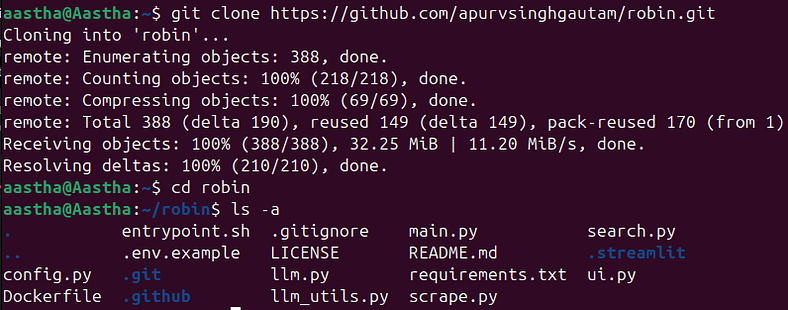
cp .env.example .env
nano .env  # Add your OpenAI or Ollama base URL here
OPENAI_API_KEY=your_openai_api_key
ANTHROPIC_API_KEY=your_anthropic_api_key
GOOGLE_API_KEY=your_google_api_key
OLLAMA_BASE_URL=your_ollama_urlStep 3: Docker
sudo docker build -t robin .
Step 4: Run Robin by Docker
docker run --rm \
   -v "$(pwd)/.env:/app/.env" \
   --add-host=host.docker.internal:host-gateway \
   -p 8501:8501 \
   apurvsg/robin:latest ui --ui-port 8501 --ui-host 0.0.0.0
After completion you will see the result like this. You can go to these links to check out the data and even download the file in markdown format.


By combining LLMs with specialized scraping techniques, it transforms what was once a tedious, manual process into an automated workflow that actually works.
The dark web isn’t going anywhere, and neither are the threats emerging from it. But with tools like Robin, we’re finally getting better at shining a light into those shadows, making threat intelligence gathering more efficient and accessible.
However, tools like Robin are double-edged swords. While they empower defenders with better threat intelligence, they also lower the barrier to entry for malicious actors. The responsibility lies with us to use such powerful technology ethically and legally.
So, the real question isn’t can we use AI to explore the dark web, it’s how we choose to use it. And in cybersecurity, that choice matters more than the tool itself.


Comments