Intercepting Network Traffic Through ARP Spoofing


Your laptop trusts ARP replies without verifying who sent them.
That single design decision is enough to let another machine silently place itself between you and your router, reading everything passing through. No malware. No exploits. No brute force. Just a protocol that was built in 1982 for trusted local networks, still running on every network you connect to today.
You’ve probably come across the term ARP Spoofing at some point, maybe in a book, or a subject or a YouTube video. You read it, nodded along, moved on (maybe, maybe not). But theory and actually doing it? Very different things. Let’s do practical today.
First, What Is ARP, and Why Should You Care?
When your device wants to send data to another device on the same network, it knows the destination’s IP address. But hardware-level communication actually runs on MAC addresses, physical identifiers burned into each network card. So, your device needs to translate: “Which MAC address belongs to this IP?”
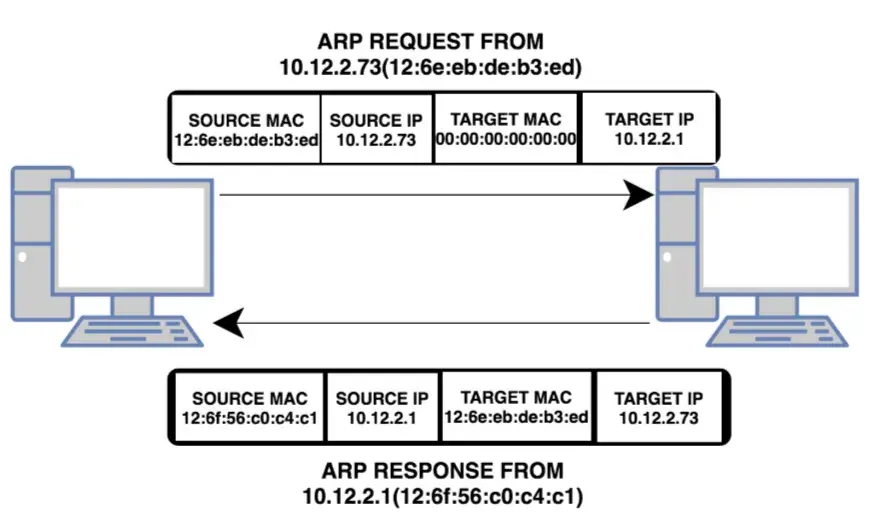
It does this by broadcasting an ARP (Address Resolution Protocol) request across the network:
“Who has IP 192.168.1.1? Tell me your MAC address.”
The router responds. Your device stores that mapping in the ARP cache a local table of IP-to-MAC translations.
Any device on the network can send an ARP reply. No one checks whether the reply came from the actual owner of that IP. ARP provides no mechanism to verify whether a reply came from the legitimate owner of an IP address. Your device simply accepts the reply and updates its ARP cache.
What Is ARP Spoofing?

ARP Spoofing, also called ARP Poisoning, is when an attacker exploits this by sending fake ARP replies to two targets simultaneously:
To the victim: “The router’s IP? That’s my MAC address.”
To the router: “The victim’s IP? That’s my MAC address.”
Both sides update their ARP caches with the attacker’s MAC.
Now all traffic between the victim, and the router flows through the attacker’s machine. The attacker can read it. Modify it. Or silently forward it so nobody notices anything is wrong.
This is a Man-in-the-Middle (MitM) attack and it’s one reason public Wi-Fi networks without proper protections are genuinely risky.
Which Devices Are Affected?
Anything on the same local network using IPv4:
Laptops and desktops on shared Wi-Fi or Ethernet
Mobile phones on the same network
Virtual machines on a shared virtual network
ARP Spoofing operates at Layer 2 of the OSI model (Data Link layer) which means it affects everything that relies on ARP for local communication, before packets even reach Layer 3 (IP).
The Lab Setup
Everything below was done in a controlled, isolated virtual lab environment, strictly for educational purposes.
Victim Machine: Ubuntu — IP 192.168.147.130
Attacker Machine: Kali Linux — IP 192.168.147.132
Gateway: 192.168.147.2
Tools: Ettercap, Wireshark, nmap
All three machines were on the same virtual network, simulating what someone on the same Wi-Fi as you could realistically do.
Step 1: Mapping the Network
First, identify your own machine’s IP and MAC. Running ip a on both machines reveals:


The MAC address matters because ARP maps IPs to MACs. Spoofing means replacing the correct MAC with the attackers.
Step 2: Finding the Gateway
Running ip route on Kali reveals the network gateway:

Then arp -n finds the gateway's actual MAC address:

Record this MAC. Once spoofing starts, the victim’s ARP cache will show this IP pointing to the attacker’s MAC instead, the core sign that the attack worked.
Step 3: Scanning for Active Hosts
A nmap ping scan across the subnet identifies everything online:
nmap -sn 192.168.147.0/24
At this point the attacker has the full picture:
Victim IP: 192.168.147.130
Gateway IP: 192.168.147.2
Their own MAC: 00:0C:29:D0:FE:BC
Step 4: Enabling IP Forwarding
This step is what separates a silent attack from an obvious one.
Without IP forwarding, the victim’s packets hit the attacker’s machine and stop. The victim’s internet drops. They notice immediately.
With IP forwarding enabled, the attacker’s machine relays packets between the victim and the gateway, so the victim’s connection works normally while everything passes through:
echo 1 | sudo tee /proc/sys/net/ipv4/ip_forward
The attacker is now invisible.
Step 5: Launching the Attack with Ettercap
Ettercap is a MitM framework built into Kali Linux. One command starts the ARP poisoning:
sudo ettercap -T -i eth0 -M arp:remote /192.168.147.130// /192.168.147.2//Parameters:
-T:text mode
-i eth0 : network interface
-M arp:remote : ARP spoofing in remote mode
/192.168.147.130//:victim
/192.168.147.2//:gateway

Ettercap is now continuously sending forged ARP replies to both the victim and the gateway. The attack is live.
Seconds later, intercepted TCP traffic starts appearing in the terminal:
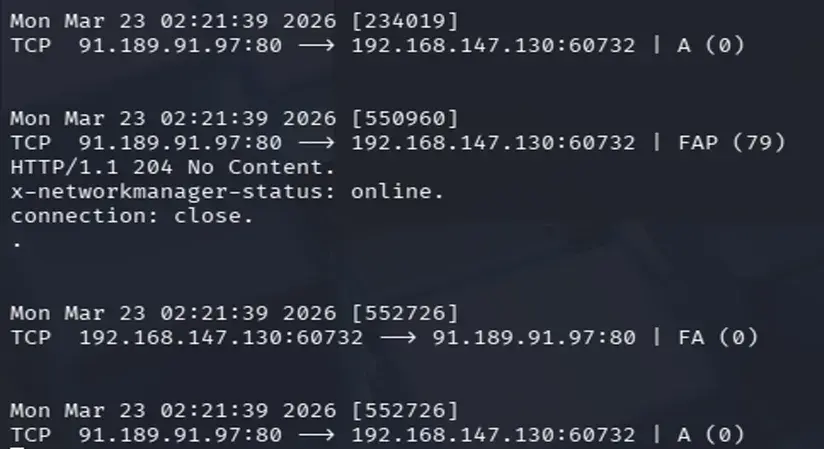
Step 6: What Wireshark Shows
With Wireshark running on the attacker machine and filtering by arp, the poisoning is immediately visible:

The attacker is flooding the network with ARP replies claiming 192.168.147.130 is at 00:0C:29:D0:FE:BC (the attacker's MAC). Wireshark flags this with a warning:

Two devices are claiming the same IP, a direct indicator of ARP poisoning.
Step 7: Capturing Credentials in Plain Text
With the MitM position established, it’s time to see what can actually be read.
On the victim machine, a browser opens http://testphp.vulnweb.com/login.php, a deliberately vulnerable test site running over unencrypted HTTP. The victim logs in and fills in profile details: name, address, phone, credit card information.
No HTTPS. Every byte travel in plain text. In Wireshark, filtering by:
ip.addr == 192.168.147.130 && http.request.method == "POST"
Username. Password. Every field the victim typed. Fully readable. No decryption required.
Why HTTPS Would Have Changed Everything
The attacker was still in the middle. The traffic still flowed through their machine. But if the site used HTTPS properly, here’s what would have been different:
The attacker would still see packets, but the contents would be encrypted with a session key only the victim’s browser and the server hold. Every byte would appear as ciphertext.
That’s the difference between intercepting traffic and understanding traffic.
ARP Spoofing enables the positional attack. HTTPS removes the value of that position. This is why HTTPS matters even on networks you trust.
Step 8: Proof on the Victim Machine
On the victim machine, running arp -n shows the poisoned ARP cache directly:

The gateway IP is now pointing to the attacker’s MAC.
From the victim’s machine’s perspective, the attacker is the router. The mapping is believed completely, no warning given, no indication anything is wrong.
Step 9: Stopping the Attack
Pressing q in the Ettercap terminal shuts everything down. Ettercap automatically sends corrective ARP replies to both parties, restoring the legitimate IP-to-MAC mappings.

The victim’s cache slowly corrects itself. To them, nothing unusual happened.
How to Defend Against This
Use HTTPS everywhere. Even if someone intercepts your traffic, TLS encryption means they get ciphertext they can’t read without the session keys. Positional advantage becomes worthless.
Dynamic ARP Inspection (DAI). Enterprise-grade switches support this. It validates ARP packets against a trusted DHCP binding table and drops spoofed replies at the switch level. The strongest network-side defense available.
Static ARP entries. For critical infrastructure (servers, gateways), manually setting ARP entries prevents them from being overwritten by forged replies. Not scalable for large networks, but highly effective for small or high-priority systems.
VPNs. A VPN encrypts all traffic before it leaves your device. Even in a fully poisoned network, the attacker intercepts ciphertext.
Network segmentation with VLANs. ARP Spoofing is bounded by broadcast domains. VLANs limit which devices share a domain, containing the blast radius to one segment.
Monitoring. Tools like ARPwatch, XArp, or Wireshark itself can detect suspicious ARP activity: sudden floods of replies, duplicate IP warnings, MAC address changes on known hosts. These are your early warning signals.
The Part That Actually Matters
ARP Spoofing doesn’t require custom malware or advanced tooling. A default Kali installation and five commands are enough. Basic stuff.
The dangerous part is how completely normal everything looks while it’s happening. The victim’s connection works. Pages load. No errors. No warnings. And the entire time, every packet passes through a machine the victim has no idea exists between them and the router.


Comments