Assembly Language & C Code Constructs: From C to CPU


Welcome back to the Reverse Engineering Essentials series! If you’ve been following along, you’ve already covered some base topics:
Static Analysis: reading PE headers, strings, and imports without executing a file
Dynamic Analysis: running malware safely and watching what it actually does
CPU architecture, registers, flags, types of malwares, PE headers
ClamAV: signature-based detection and writing your own malware signatures
YARA Rules: hunting malware at scale with pattern-matching rules
So, what’s missing? You can see that malware connects to a suspicious IP. You can write a YARA rule to catch it. But do you know WHY it connects to that IP? What logic decides when it connects? What it sends? That answer lives in assembly.
Malware authors typically write code in high-level languages such as C or C++. Compilers translate that C into machine code (bytes the CPU understands). Disassemblers reverse that process, giving us assembly language. If you can READ assembly, you can read the malware author’s mind.
In this post, we’ll go deep on how C constructs variables, if/else, loops, arrays, switch statements. We’ll also use Jasmin (a JVM assembler) as that will give you the exact idea of how instructions work.

Before getting into the core, let’s revise some basics from the bird eye view.
Levels of Abstraction

Registers


Important: EAX is the most important registerWhen a function returns a value, it’s stored in EAX. So when you see ‘call SomeFunction’ followed by ‘mov [var], eax’, the program is capturing the function’s return value. In malware, this often means capturing results like: IsDebuggerPresent() → EAX, CreateFile() handle → EAX.
Register Size Sub-Division

Instruction Pointer and Flags Register
EIP (Instruction Pointer): holds the memory address of the NEXT instruction to execute. Buffer overflow attacks famously overwrite EIP to redirect code execution.

Global vs Local Variables in Disassembly
This is one of the first patterns you must learn to recognize and it’s conceptually simple once you understand how memory works. The rule is:
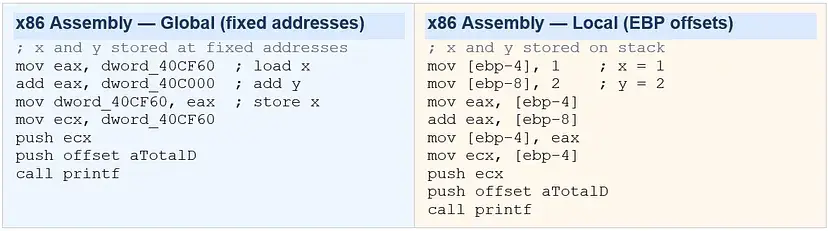
Global variables are referenced by FIXED memory addresses (e.g., dword_40CF60). Local variables are referenced by offsets from EBP (e.g., [ebp-4], [ebp-8]). If you see a hardcoded hex address, it’s global. If you see ebp+/-, it’s local.
Why does this matter for malware analysis? Global variables often hold persistent malware state, C2 server addresses, encryption keys, mode flags (“am I in stealth mode?”). Local variables are temporary per-function values. Here’s the same C code written two ways:

Download Jasmin for hands on practice.
One useful way to understand the connection between high‑level code and assembly is by compiling programs and examining the generated instructions.For Java‑based bytecode experiments, the Jasmin assembler can be used to generate JVM assembly. By writing simple programs and observing their compiled instructions, we can learn how compilers translate high‑level constructs into low‑level operations.
Core Assembly Instructions
1. Data Movement: MOV and LEA
MOV is the most common instruction in all of assembly. It copies data from source to destination like an assignment operator (=). LEA (Load Effective Address) computes an address and stores it without accessing memory. It computes an address without dereferencing memory. Compilers often use lea as a convenient way to perform arithmetic like multiplication or addition in a single instruction.
mov eax, ebx         ; EAX = EBX  (copy register to register)
mov eax, [ebx]       ; EAX = memory[EBX]  (load from address in EBX)
mov [ebx], eax       ; memory[EBX] = EAX  (store to address)
mov eax, 0x42        ; EAX = 0x42  (load immediate/constant)

lea eax, [eax + eax*2]   ; eax = eax * 3
; Compilers love using lea for things like: int *p = &arr[2];
2. Arithmetic: add, sub, mul, div, inc, dec
add eax, ebx         ; EAX = EAX + EBX
sub eax, 0x10        ; EAX = EAX - 16
inc edx              ; EDX = EDX + 1  (faster than 'add edx, 1')
dec ecx              ; ECX = ECX - 1  (used heavily in loops)
mul 0x50             ; EDX:EAX = EAX * 0x50  (result stored in TWO registers!)
div 0x75             ; EAX = EDX:EAX / 0x75, EDX = remainder

; Real example: a = a + 11
mov eax, [ebp+var_4] ; load 'a' into EAX
add eax, 0Bh         ; add 11 (0x0B = 11 decimal)
mov [ebp+var_4], eax ; store result back to 'a'
3. Logical & Bitwise: xor, and, or, shl, shr, ror
These are heavily used in malware for encryption, obfuscation, and optimization tricks:
xor eax, eax         ; EAX = 0  ← commonly used to zero a register because it produces a smaller instruction and avoids loading an immediate value.
; Why? Same as 'mov eax, 0' but only 2 bytes vs 5 bytes
; You'll see 'xor eax, eax' at the START of almost every function

and eax, 0xFF        ; keep only lowest byte of EAX
or  eax, 0x01        ; set bit 0 of EAX

shl eax, 2           ; EAX = EAX << 2  (multiply by 4)
shr eax, 1           ; EAX = EAX >> 1  (divide by 2)
ror bl, 2            ; rotate BL right by 2 bits

; XOR is THE encryption primitive of malware — single-byte XOR key:
xor [esi], 0x42      ; decrypt/encrypt byte at ESI with key 0x42
inc esi              ; move to next byte
XOR is Malware’s Best FriendSingle-byte XOR encryption is the most common obfuscation technique in malware. The pattern is: a loop that XORs each byte of a payload buffer with a fixed key byte. When you spot ‘xor [esi], KEY’ inside a loop in disassembly, you’ve found an encryption/decryption routine. The key is usually a small constant like 0x41, 0xCC, etc.
XOR is Malware’s Best FriendSingle-byte XOR encryption is the most common obfuscation technique in malware. The pattern is: a loop that XORs each byte of a payload buffer with a fixed key byte. When you spot ‘xor [esi], KEY’ inside a loop in disassembly, you’ve found an encryption/decryption routine. The key is usually a small constant like 0x41, 0xCC, etc.
4. NOP: Invisible Instruction
nop                  ; opcode 0x90 — No OPeration. Does nothing.

; WHY DOES IT EXIST? Buffer overflow exploits!
; Attackers create 'NOP sleds' — long sequences of NOPs before shellcode.
; If EIP lands ANYWHERE in the NOP sled, it slides into the payload.

90 90 90 90 90 90 90 90  ; NOP sled (8 bytes)
90 90 90 90 90 90 90 90  ; NOP sled (8 more bytes)
[shellcode starts here]  ; actual payload
C Code Constructs in Assembly
This is the skill that separates a reverse engineer from someone who simply reads instructions.
1. If / Else + cmp + conditional jump
Every if/else in C compiles to the same fundamental pattern: a CMP instruction followed by a conditional jump. The CMP instruction sets flags without changing any values, and the jump checks those flags.

How to Read This Pattern?
Step 1: Find the CMP.
Step 2: The conditional jump right after it tells you the OPPOSITE of the condition — if C says ‘if x==y’, the assembly says ‘jnz’ (jump if NOT equal — to skip the true branch).
Step 3: The jump target is the ELSE block.
Step 4: The true block ends with an unconditional ‘jmp’ to skip the else.

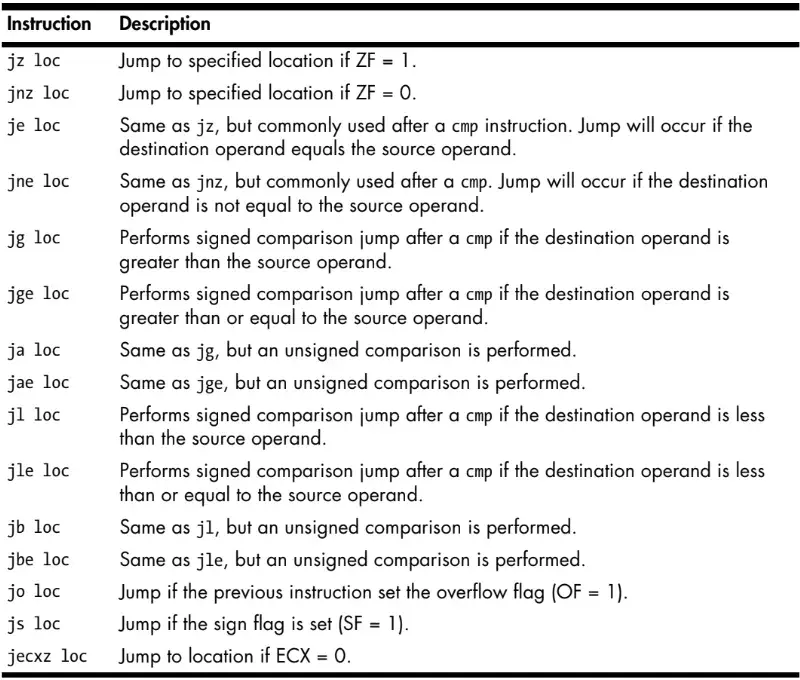
2. Jump Instructions
3. Loops: for, while, and the Backwards Jump
Loops are the engines of malware payloads. A ransomware encrypts files in a loop. A keylogger collects keystrokes in a loop. A network scanner iterates IPs in a loop. Recognizing loops in disassembly is non-negotiable.
For Loop

While loop

If this feels overwhelming, that’s normal. Assembly is not something you master in one sitting. The best way to learn it is to compile small programs, inspect the generated instructions, and slowly build pattern recognition.
In Part 2, we’ll explore switch statements, arrays and memory access, function calls and stack frames, recognizing common malware routines in assembly.


Comments