From GitHub Repo to Live Website (and Then Auto-Deploy)

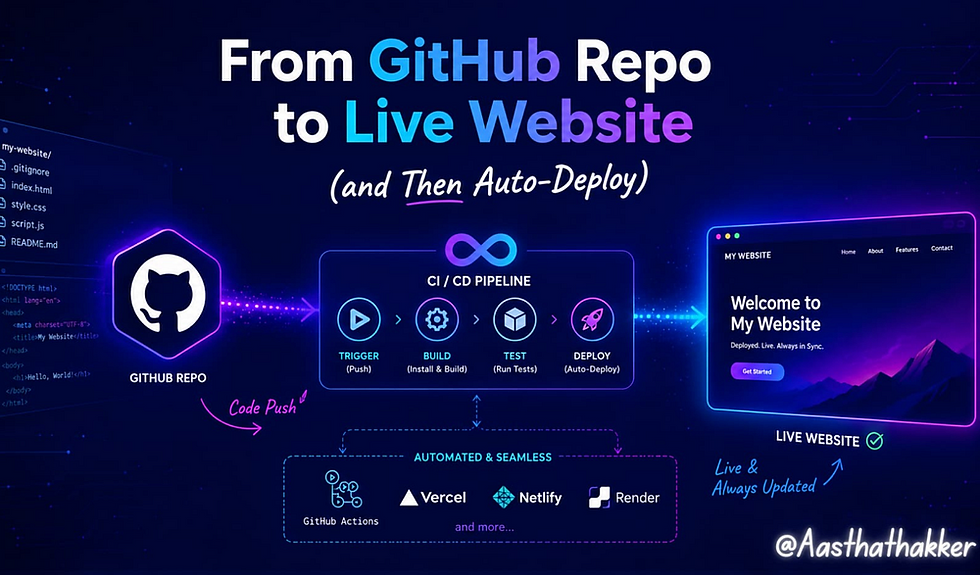
We’ve so far successfully created our website, learnt to use Git and GitHub to record all changes to our code, and Docker to ensure the app behaves the same across environments. All of these represent the core foundations of DevOps practices, bringing Development and Operations together to speed up software delivery. Our code is currently secured in a private repo in GitHub, but there is a single missing point.
When you share a GitHub repo with another person, they cannot “see” a functioning live web application.
What they see is just files, folders and source code, but not the attractive digital shop window you created. How do we translate these files into a web app that someone can readily view? What if we need to update our website in the future, is that a process that we have to run over and over?
In this blog, we will look at these questions as we enter the world of deployment, automation and CI/CD with GitHub Actions.
Getting the HetAas Atelier Live
During my vacation, I decided to do something different. Instead of spending all my time coding, I picked up an art hobby that I hadn’t touched in almost three years and started building HetAas Atelier, my small resin art website.
You don’t need to build a resin art website to follow along. This just happens to be my creative hobby, so I chose it as the project we’ll learn with. Feel free to apply the same concepts to your own website, portfolio, or college project.
It’s far from complete and definitely not as functional as I’d like it to be but that’s actually perfect for what we’re about to learn. We’ll use this project to understand how to deploy a website, automate updates, and build a simple CI/CD pipeline with GitHub Actions.
What deployment actually means
Deployment is just the process of taking your code from “sitting on a server as files” to “running somewhere people can actually reach it.” That’s it. No more mystery to the word than that.
Here’s the full path your code travels:
Local Computer
      ↓
GitHub Repository
      ↓
Hosting
      ↓
Internet
      ↓
User's Browser
GitHub is your code-repository. GitHub isn’t your code-runner. Your repo is the filing cabinet; the hosting is the shop floor.
Hosting
Hosting is whatever computer (owned by someone else, most of the time) keeps your website’s files ready and serves them out whenever someone types your URL.
There are two flavors worth knowing:
Static hosting: serves fixed files (HTML, CSS, JS, images) exactly as they are. The server always serves the same static files. Any personalization happens later in the browser through JavaScript. The HetAas Atelier, being a product catalog with a cart page, is a great fit for this.
Dynamic hosting: involves a server doing calculations per request: checking a database for stock, generating a personalized page, processing a payment. If the HetAas Atelier later adds live order tracking or a login system, that’s when we’d need this.

For now, our shop is static, and that’s exactly why GitHub Pages is such a natural fit.
So, what is GitHub Pages?
GitHub Pages is GitHub’s own free static hosting service. You point it at a repository, and GitHub serves the contents as a website, no separate hosting provider, no extra bill, no server to manage.
A few things worth knowing before you use it:
It’s built for static content, plain HTML/CSS/JS sites, or frontend frameworks like React once they’re built into static files.
There are two types: User/Organization Pages (one per GitHub account, lives at username.github.io) and Project Pages (one per repository, lives at username.github.io/repo-name).
Repository naming matters for User Pages specifically, it has to be named exactly username.github.io for that special one-per-account site.
Limitations exist too, it won’t run backend code, databases, or anything that needs a live server process. It’s brilliant for portfolios, documentation, and static shops like ours, but it’s not going to host a full e-commerce checkout system with payment processing on its own.
What happens behind the scenes when you push
git push
    ↓
GitHub Repository
    ↓
GitHub Pages Build
    ↓
Generated Website
    ↓
GitHub's CDN
    ↓
Browser
The moment you push to the branch GitHub Pages is watching, GitHub builds your site and pushes it out to its content delivery network (a set of servers spread across locations so that whoever visits loads the site from somewhere close to them). You didn’t do any of that manually. This is the first real taste of automation in this whole journey, even before we officially talk about CI/CD. This is where concepts like DNS, domains, and HTTPS naturally come into the picture, and I’ll assume you’re already familiar with their basics.
Why does React need “building” but plain HTML doesn’t?
Plain HTML and CSS are already something a browser understands natively. You write it, you open it, it works.
React (and most modern frameworks) are written in JSX and modern JavaScript that browsers can’t read directly. npm run build is the command that translates all of that into plain HTML, CSS, and JavaScript the browser can actually run, usually dropped into a folder called dist or build. That folder is what actually gets deployed, not your raw source code. If the HetAas Atelier's frontend is built in React, this dist folder is what GitHub Pages ends up serving.
Source Code
    ↓
Build
    ↓
Optimized Files
    ↓
Deployment
Doing it the manual way first and why it hurts
Before any automation, this is genuinely how deployment worked for a long time, and honestly still does in plenty of small setups:
Developer
    ↓
Build
    ↓
Upload Files
    ↓
Replace Old Files
    ↓
Website Updated
Then you run the build yourself, push the results and then upload the build output manually. Seems ok for one guy, once. Now scale that up a little.
Manual deployment works when you’re the only developer. As projects grow, however, it’s easy to forget a build, upload the wrong files, or become the only person who knows the deployment process. These are exactly the problems CI/CD was created to solve.
Practical: getting the HetAas Atelier live on GitHub Pages
Time to actually do it.
Pushing latest HetAas Atelier code to GitHub (you’ve already got this part down from the Git/GitHub blog).
In repository, go to Settings → Pages.
Under “Build and deployment,” pick your source, either a branch (like main branch) or, if you're using a framework, GitHub Actions as the source.
Save, and GitHub will give you a live URL, something like aasthathakker.github.io/HetAas-Atelier.
Want a custom domain? Add it under the same Pages settings, and update your domain’s DNS records to point to GitHub as instructed.
Make a small change, push it, refresh the live site in a minute or two, and watch it update.

That last step, pushing a small change and watching it appear is the moment this stop being theory. The HetAas Atelier is now something you can send a link to, and someone can actually shop on.

Now here’s the thing worth sitting with for a second. Everything we just did by hand, building, uploading, watching the site refresh is exactly what modern DevOps teams don’t do by hand. They automate every single one of those steps. Before we get there and teach our pipeline to do this on its own, it helps to actually feel the manual process first, mistakes and all, so the automation coming up actually means something to you instead of being magic you copy-paste.
Making Deployment Happen on Its Own
We just deployed manually. It worked. But we already listed out why manual doesn’t hold up once updates get frequent or the team grows. So let’s fix that properly.
Where deployment sits in the bigger picture
Write Code (your actual code)
    ↓
Build (Turning that code into something that actually runs, like npm run build)
    ↓
Test (running automated checks)
    ↓
Package (bundling the built application, along with everything it needs to run, into one tidy unit that can be moved and installed anywhere without falling apart.)
    ↓
Deploy (getting that packaged application running somewhere real)
    ↓
Monitor (So app doesn't break)
Why teams stopped doing this by hand
Releases happen far more often than once, sometimes several times a day.
Humans make mistakes, especially repetitive ones done under time pressure.
A bad deploy in production costs real money and real trust.
Rolling back a bad change needs to be fast, not a scramble.
More than one developer means more than one person needs to deploy safely, without stepping on each other.
This is genuinely where the word “DevOps” starts to mean something concrete instead of a buzzword on a job posting.
What CI/CD actually stands for
Continuous Integration (CI): every time code is pushed, it gets automatically checked (built, tested) before it’s trusted.
Continuous Delivery: the application is always in a state where it could be deployed, at any moment, with one click.
Continuous Deployment: same as above, except that last click happens automatically too. Push code, and if everything passes, it’s live.
There’s one word you’ll hear constantly once you start working on real teams: artifact.
Source Code
    ↓
Build
    ↓
Artifact
    ↓
Deployment
An artifact is just the actual output of the build step, the finished, packaged thing that’s ready to be deployed, saved somewhere so it doesn’t need to be rebuilt every time. What it looks like depends entirely on the language:

GitHub Actions can even store this artifact for you between jobs, so a "build" job and a separate "deploy" job can hand it off to each other without rebuilding from scratch. Once teams scale up, these artifacts often get pushed into a dedicated artifact repository instead of just sitting in a pipeline but that's a story for another day.
GitHub Actions
GitHub Actions is GitHub’s built-in automation tool. It watches your repository for events (like a push) and runs a set of instructions in response no separate CI/CD tool needed, no extra account.
The vocabulary, before the code:
Workflow: The automation defined inside a .github/workflows/*.yml file.
Event: the trigger, like “someone pushed to main."
Runner: the machine (GitHub provides these) that actually executes your workflow.
Job: a group of steps that run together.
Step: a single task inside a job, like “install dependencies” or “run build.”
Action: a reusable, pre-built step someone else wrote, pulled from the Marketplace.
Get comfortable with these words before touching YAML. The syntax is easy once you know what each piece is for.
YAML, kept to what you actually need
Why does GitHub Actions use it? Because a workflow is essentially a list of instructions with a clear order and clear grouping, and YAML is built exactly for that readable by a machine, but also readable by you. Get the indentation wrong, though, and the whole file breaks. That’s the one thing YAML is fussy about.
That’s most of what you need to read a workflow file:
name: what shows up in GitHub's UI.
on: the event that triggers this.
jobs: the work to be done.
steps: the individual tasks inside a job.
uses: pull in a pre-built action.
run: run a plain shell command.
Building the HetAas Atelier’s first pipeline
In your repo, create a file at .github/workflows/staticsite.yml:

Commit this file, push it, and go to the Actions tab in your repository. You’ll watch each step run live with green checkmarks appearing one by one, if successful. From this point forward, every push to main deploys itself. No manual upload, ever again.

Secrets and environment variables
Notice ${{ secrets.GITHUB_TOKEN }} in that YAML above, that's a secret (Not a Lock up’s ‘secret’), and it's a good moment to talk about why they exist.
GitHub Secrets: encrypted values stored in your repo settings, never shown in logs, never committed to code.
Repository Secrets: secrets scoped to one repository, added under Settings → Secrets and variables → Actions.
Environment variables: values your workflow or application reads at runtime, some secret, some not (like a stage name).
Why you never commit API keys? a key sitting in your code is a key sitting in your Git history, forever, visible to anyone with repo access, even if you delete it in a later commit.
The HetAas Atelier doesn’t need any real secrets yet, no external API, no payment gateway wired up. But the day it does (a payment processor key, for instance), this is exactly where it goes. Every production project uses this pattern.
Quality gates; stopping bad code before it ships
Push
  ↓
Lint
  ↓
Tests
  ↓
Build
  ↓
Deploy
Linting: automatically checking code style and catching obvious errors.
Formatting: enforcing consistent code style across everyone on the team.
Automated tests: checking that the application actually behaves the way it’s supposed to.
The whole point of a quality gate is simple: if any of these fail, the pipeline stops right there. Deployment never happens. A broken build never reaches customers. This is the difference between “we hope nothing’s broken” and “nothing broken makes it through.”
And when something still slips through; rollback
Quality gates catch a lot, but not everything. Sometimes a change passes every test and still breaks something in the real world, under real traffic, in a way nobody predicted. This happens to every team, no matter how careful.
Deployment Fails
    ↓
Rollback
    ↓
Previous Version Restored
Honestly, most companies care far more about how fast they can roll back than how fast they can deploy in the first place, a slow deploy is an inconvenience, a slow rollback during an outage is a real problem. GitHub Pages makes this reasonably simple too, since every deployment is just another commit, reverting to a previous commit and pushing again puts the older, working version straight back live.
Developer
  ↓
Commit
  ↓
Push
  ↓
GitHub
  ↓
GitHub Actions
  ↓
Build
  ↓
Test
  ↓
Deploy
  ↓
Production
  ↓
User
So, what is DevOps, really?

By this point you’ve already practiced most of what the word actually means, even if nobody called it that along the way:
Version control with Git
Collaborative development through GitHub
Automated workflows
Continuous Integration
Continuous Delivery
Repeatable, predictable deployments
While a GitHub Actions workflow isn’t Infrastructure as Code in the traditional sense, it follows the same philosophy of managing automation through version-controlled code, just written in YAML instead of clicked through a UI
People + Processes + Automation = Reliable Software DeliveryWhat does a DevOps engineer do day-to-day, exactly?
We’ve mentioned it a bit in this blog post, so to be explicit, beyond the methodology, a day in the life of a DevOps engineer largely revolves around bridging the gap between writing software and running it in the world. Their typical remit will involve:
Building and maintaining CI/CD pipelines, much like we did above, but for much larger, messy codebases with multiple developers making commits all day long.
Managing infrastructure. This is where an application lives, its servers, cloud services, environments, usually treated as code (known as “Infrastructure as Code”) rather than being painstakingly put together manually.
Handling deployments and rollbacks. Making sure software is released reliably to live environments, and just as importantly, making sure any problematic release can be instantly undone.
Managing secrets and access. This concerns dictating who or what has access to production, and ensuring secret credentials aren’t leaked in the code itself.
Bridging the development and operations gap. The traditional divide was that one group (developers) created software, while another group (operations) ran it, this disconnect often leads to the aforementioned problems. The DevOps engineer is there to prevent friction and foster collaboration in that transition.
Container and orchestration management. Packaging applications using containers such as Docker, and then making sure they run efficiently at scale, in fact, that’s where this series is heading next!
Where that leaves us
Our repository went from a directory filled with code, to a fully functional website that deploys itself automatically. The problem now, however, stares us in the face in glaring neon: This pipeline currently is entirely run on trust.
Trust that we didn’t slip a secret into the code, and trust that the dependency we use has not got a known issue lurking inside, and even trust that the workflow file is not maliciously edited.
Another, more silent, gap we have skipped over throughout this entire blog: our current pipeline can both build and deploy HetAas Atelier fine on the GitHub Pages servers, but when the web application requires its own server, database or when the application should run the exact same way on a users laptop as in the environment it is actually deployed into, we fall back to the “It works on my machine” and again, that’s the exact issue Docker is trying to solve that I’ve already covered in a previous blog post.
The interesting part is that I’m learning this alongside you. DevOps is still new to me, and every concept I write about is something I’ve recently explored, experimented with, and occasionally broken before understanding. That learning process is exactly why I write these blogs. My goal isn’t just to document what I know, but to explain it in a way that’s easier to understand than it was when I first learned it.
Before I wrap up, I’d like to share something I’ve learned outside of technicalities.
A small note before we wrap up. Constructive criticism and thoughtful suggestions are always welcome; they’ve helped me improve every blog I’ve written. What I don’t engage with are baseless arguments or criticism that exists only to discourage. If a blog doesn’t resonate with you, it’s perfectly okay to move on. I also believe in being transparent, I do use AI to help rephrase or polish my writing, just like many writers use grammar or editing tools. The ideas, writing pattern, examples, analogies, learning, experiments, and experiences are still my own. Respectfully, I don’t believe every opinion deserves a response. If your feedback helps improve the content, I’m genuinely grateful. If it’s only meant to mock or discourage, I’ll leave it where it belongs. And if you’re someone thinking about starting your own blogging journey, don’t let empty criticism stop you. Listen to people who help you grow, not those who only know how to pull others down.


Comments