Know the Toxic Duo or They’ll Know you: ToxicPanda and WinOS 4.0 Malware


🎉 Celebrating 1 Year of My Blogging Journey! 🎉
Exactly one year ago today, on the early morning of November 2, 2023, I took a leap of faith and hit “publish” on my first blog post. It was a moment filled with hesitation, self-doubt, and a million questions: “Will it be good enough? Will people even read it?” But sometimes, all you need is a little push from the people around you.
To everyone who believed in me, motivated me, and helped spread my words, thank you from the bottom of my heart. Here’s to many more years of sharing, learning, and growing together.

We’ve all heard the dreaded word “malware” thrown around more times than we can count. It’s like a digital plague, infecting devices left and right, faster than the common cold. Today’s spotlight is on “Toxic Panda” & “WinOS 4.0”. These two malicious mischief-makers have been making headlines, capturing the attention of techies and normies alike.
It’s ironic, really — pandas are supposed to be cute and cuddly, but this Toxic Panda is anything but.
Before I did any research, I was honestly a bit angry by the name. I mean, why “Panda”? I love pandas. If you’re going to call something toxic, how about a snake, a crocodile, bats or even Humans? But no, it’s a panda. Why!!??
Naming Convention: The “Panda” label aligns with other threat groups associated with China (e.g., “Emissary Panda,” “KungFu Panda”). Using this nickname helps analysts quickly identify the threat group’s likely origin, objectives, and typical attack vectors.
CrowdStrike’s Naming System: CrowdStrike is particularly well-known for using animal themes to signify the nation-state origin of various APTs:
Panda: Used for threat groups believed to originate from China.
Bear: Indicates Russian groups.
Kitten: Signifies Iranian threat actors.
Chollima: Refers to North Korean actors.
(Well I still think bats or humans could have been okai but, anyways!)
WinOS 4.0 is a twisted malware that uses Remote Access Trojans to infiltrate gaming rigs and target cryptocurrency wallets.
What is ToxicPanda?
Toxic Panda is an Android-based banking malware that operates by targeting banking and financial apps on users’ devices. Its unique approach combines techniques like overlay attacks and automatic transaction capabilities, allowing it to access and manipulate user credentials in real time. Toxic Panda’s methods are further enhanced by DVa, enabling it to evade detection and adapt to different security environments.
It’s essential to clarify a few key terms:
ATO (Account Takeover): A tactic where attackers gain unauthorized access to a user’s account, typically through stolen credentials, allowing them to take control of financial accounts.
ODF (On-Demand Fraud): A type of fraud in which attackers exploit real-time access to a user’s device or account to initiate unauthorized financial transactions instantly.
TgToxic (Targeted Toxicity): This refers to the strategy used by malware to specifically target high-value users, applications, or financial accounts, maximizing the financial impact on victims.
ATS (Automated Transaction System): A malicious system embedded in the malware that can automatically execute transactions, bypassing user verification and enabling unauthorized fund transfers.
DVa (Dynamic Vulnerability Adaptation): A method used by advanced malware to identify and exploit new vulnerabilities dynamically, adapting to security measures that might otherwise block its progress.
How ToxicPanda Works?
ToxicPanda employs a multi-phase attack, each step carefully designed to exploit different aspects of the Android operating system:
Account Takeover (ATO) through Accessibility Permissions:
ToxicPanda’s attack starts with obtaining elevated privileges on the device. By manipulating accessibility permissions, it gains deeper access to users’ actions on the device, which is critical for Account Takeover (ATO). With these permissions, ToxicPanda can:
Monitor User Actions: It tracks user inputs, focusing on banking and financial credentials.
Automate Actions on User Behalf: It can simulate clicks and inputs, enabling it to circumvent security features that would normally require user action.
2. Overlay Attacks for Credential Theft: Overlay attacks are a core feature of ToxicPanda, leveraging TgToxic strategies to target users of banking apps specifically:
Fake Login Screens: ToxicPanda places overlays on legitimate banking apps, displaying fake login prompts that mimic the app’s real interface.
Real-Time Credential Harvesting: The malware captures login credentials in real-time, sending them directly to the attackers for immediate use.
3. On-Demand Fraud (ODF) Enabled by Automated Transaction Systems (ATS): ToxicPanda’s ATS feature allows it to execute unauthorized transactions as soon as it gains access to user credentials. This form of On-Demand Fraud (ODF) is particularly dangerous because it enables attackers to complete transactions without alerting the user. With ATS, ToxicPanda can:
Initiate Instant Transactions: ToxicPanda can conduct fund transfers, payments, or purchases instantly, often before the user realizes their credentials have been stolen.
Circumvent Security Protocols: By automating these processes, the malware bypasses typical security prompts that would alert the user.
4. Dynamic Vulnerability Adaptation (DVa) for Stealth and Persistence: A significant challenge for traditional malware detection systems is ToxicPanda’s ability to adapt. Through DVa, the malware detects changes in the environment and alters its tactics:
Code Obfuscation: ToxicPanda continuously changes its code to avoid being flagged by antivirus software.
Behavioral Adaptation: It adapts its actions to evade detection, for example, by hiding high-risk behaviors until the device’s security is temporarily lowered.
What Makes ToxicPanda So Dangerous?
Highly Targeted Toxicity (TgToxic): ToxicPanda’s ability to target specific financial applications means it focuses on high-value accounts, maximizing the financial impact.
Real-Time Fraud Execution: With ATS and ODF, the malware initiates unauthorized transactions immediately after obtaining credentials.
Advanced Anti-Detection Mechanisms: DVa allows it to evade detection through adaptability, enabling it to remain hidden for extended periods.
How to Identify a ToxicPanda Infection:
ToxicPanda is designed to operate covertly, but certain behaviors may signal an infection:
Unusual Banking Activity: Unauthorized transactions are a key sign of ODF-related attacks.
Device Sluggishness: Background monitoring and actions might slow down your device.
Unexpected Permission Changes: Changes in accessibility permissions or app behaviors can indicate a compromise.
How to Protect Yourself Against ToxicPanda?
While ToxicPanda is an advanced threat, taking proactive steps can help minimize risk:

WinOS 4.0
In the world of online gaming, where users interact, compete, and even conduct financial transactions, security risks are continually evolving. A new, highly dangerous malware strain named WinOS 4.0 has emerged, and it’s taking aim at gamers.
WinOS 4.0 is a sophisticated strain of malware designed to target the gaming community on Windows-based systems. While gaming environments are generally designed for high performance and user engagement, they also present unique security challenges, as users are often logged in to multiple online accounts, from gaming profiles to cryptocurrency wallets.
What sets WinOS 4.0 apart is its combination of stealth and potency. It embeds itself deep within the system, leveraging Remote Access Trojan (RAT) capabilities that allow attackers to remotely control infected machines. Through these methods, attackers can:
Monitor User Activity: Track keystrokes, access files, and monitor real-time actions.
Steal Cryptocurrency and Credentials: Specifically targeting cryptocurrency wallets like OKX Wallet and MetaMask, WinOS 4.0 is designed to capture sensitive data, making it easy for attackers to steal assets.
Breaking Down the WinOS 4.0 Attack Chain
WinOS 4.0 operates through a multi-stage attack process, combining different techniques that allow it to evade detection and maximize its impact.
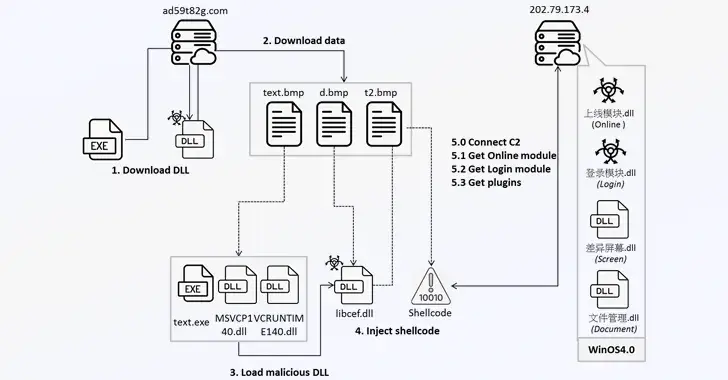
1. Remote Access Trojans (RAT) as the Backbone of Control
At the core of WinOS 4.0 is its RAT capability, a feature commonly found in remote hacking tools but now optimized to target gaming environments. Remote Access Trojans like gh0st RAT have been used by attackers for years, granting them a stealthy presence on infected machines. In the case of WinOS 4.0, the RAT functionality enables attackers to:
Take Full Control of the Device: RATs allow attackers to remotely access and manipulate an infected computer, effectively turning it into a puppet.
Monitor Real-Time Actions: The RAT is able to capture every keystroke, allowing it to intercept passwords, wallet keys, and private information.
Launch Further Malware: Attackers can install additional malware to enhance control or exfiltrate specific types of data.
2. DLL Injection for Stealth and Persistence
To avoid detection and remain active on the system, WinOS 4.0 uses a technique known as DLL injection. This process involves injecting a malicious Dynamic Link Library (DLL) into legitimate processes running on the machine, blending in with system files to evade anti-virus and other security measures.
DLL injection gives WinOS 4.0 several advantages:
Persistence: The malware can survive system reboots and remain active over time.
Avoidance of Security Scans: By embedding itself in trusted processes, WinOS 4.0 can bypass traditional security scans and avoid raising red flags.
Ability to Evade Detection: With DLL injection, the malware operates under the radar, ensuring that it remains invisible to many anti-malware solutions.
3. Targeting Cryptocurrency Wallets (OKX Wallet and MetaMask)
Gaming and cryptocurrency have increasingly intersected as many gamers also use digital assets for transactions within and outside of gaming platforms. WinOS 4.0 capitalizes on this by specifically targeting cryptocurrency wallets, including popular options like OKX Wallet and MetaMask:
Credential Theft: By tracking user activity and capturing keystrokes, WinOS 4.0 steals login credentials and wallet keys, granting attackers unauthorized access to cryptocurrency funds.
Direct Wallet Access: Once the malware captures wallet information, it can initiate unauthorized transfers, draining funds without the user’s knowledge.
MitM Attacks: By hijacking communication between the wallet and network, the malware can intercept data sent to and from the wallet, allowing attackers to redirect funds.
WinOS 4.0 leverages its RAT and DLL injection techniques to achieve these goals, making it highly effective at compromising users’ wallets without drawing attention.
Signs of WinOS 4.0 Infection
Because of its stealthy nature, detecting WinOS 4.0 isn’t easy. However, certain behaviors may indicate that the malware is active on your system:
System Lag and Sluggishness: The RAT’s data collection activities can lead to noticeable slowdowns, especially during gameplay.
Unusual Cryptocurrency Activity: Unauthorized transfers or notifications from your wallet app can be a sign of compromise.
Pop-Ups or System Errors: DLL injection can sometimes result in errors or pop-ups if the injected DLL conflicts with other processes.
Protecting Yourself Against WinOS 4.0
For gamers, protecting against WinOS 4.0 requires both vigilance and proactive security measures. Here are some critical steps to safeguard your systems and wallets:

I’ll be back next Thursday with more insights. Though I’m not sure I’ll ever get fully used to this “Toxic Panda” name, I’ll keep working on digesting it!


Comments