LinkPeek: A Passive URL Pre-Analyzer
- Aastha Thakker
- May 21
- 6 min read


Have you ever hovered over a link, felt something looked off, and still clicked it anyway because checking it properly felt like too much work?
Or maybe you are someone who constantly switches tabs to open VirusTotal just to verify whether a URL is safe, only to realize how repetitive and interrupting that process becomes after the tenth link of the day.
The truth is nobody realistically performs a full manual check for every single URL they encounter. You get a suspicious-looking link in a message, email, forum, or dashboard. You pause for a second, try reading that long messy URL carefully, maybe squint at the domain name, and then either:
open it anyway,
ignore the doubt,
or stop your entire workflow just to investigate it manually.
Most people choose the first option. Not because they do not care about security, but because friction slowly kills good habits.
That exact problem made me build “LinkPeek”: a lightweight browser extension that passively analyzes URLs on hover and flags suspicious indicators before you even click them.
The goal was never to replace human judgment or pretend to be another all-in-one threat intelligence platform. It is more like a quick “something feels off here” layer for people who deal with links constantly, SOC analysts, researchers, students, developers, or even people who are just tired (or lazy like me) of repeatedly opening security scanners for basic checks.
Because sometimes suspicious links do not get clicked due to lack of awareness. They get clicked because security checks feel inconvenient in the middle of real work.
Why VirusTotal Is Not Actually the Problem
Reputation tools still matter. That is not the argument here. The problem is that phishing domains appear faster than reputation systems can catch them. A domain registered three hours ago probably looks completely harmless on any scanner right now, because nobody has reported it yet. Zero detections. Green across the board.
The actual indicators of a suspicious link are structural. They show up much earlier than reputation data does, and most of them are visible directly in the URL:
Domain registered 4 days ago
TLD in the high-risk category (.xyz, .top, .tk, .ru)
Domain name like paypa1-secure-login.xyz(close to PayPal, not actually PayPal)
Query parameters like ?redirect= or ?goto=
Shortened URL hiding where it actually goes
High character entropy, domain looks randomly generated, the way DGA malware generates domains
None of that requires an external call. It just requires looking at the URL structure, which means it can be automated locally.
What LinkPeek Does

How LinkPeek Works
Pretty straightforward once you have it installed:
Copy the link or just hover over it.
Extension pulls structural features out of the URL
Local heuristics run a weighted risk check
Tooltip shows up with a score and whatever signals were flagged
If you want reputation data on top of that, you can trigger a VirusTotal lookup manually from the popup once you enter the API.
No clicking. No switching tabs. No interruption to whatever you were doing.
The Scoring Model
Scoring is not just adding up points. It uses a severity-weighted scoring with tier ceilings, so a URL with three medium signals does not suddenly score as critical. The score reflects what the evidence actually supports, not a sum that inflates with every additional flag.
CRITICAL signals (executable payload, banking on bad TLD) → base score jumps to 90
HIGH signals (raw IP, homograph, brand squatting) → base score 75
MEDIUM signals (typosquatting, bad TLD, shortener) → base score 45
WEAK signals (long domain, redirect param, keywords) → base score 20
Each additional signal at the same or lower severity adds incremental points.

Let’s Actually Break One Down
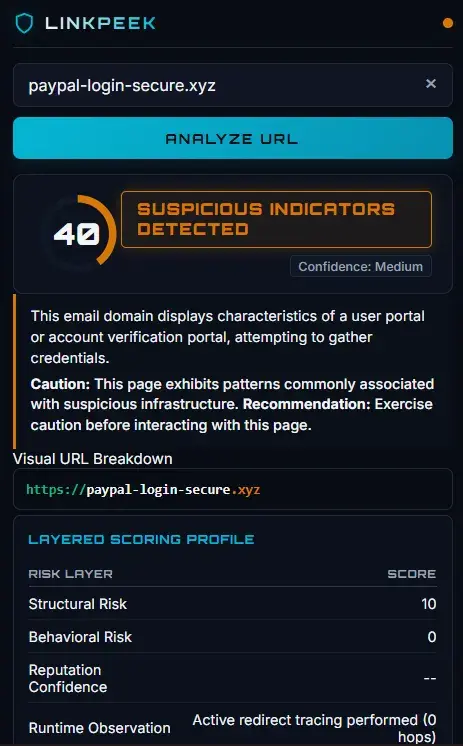
Take this: paypal-login-secure.xyz
Looks almost right. That is the whole point of it.
Here is what LinkPeek catches without loading the page at all:
Typosquatting: “paypal” matched against the monitored brand list
Suspicious TLD: .xyz flagged as high-risk
Keyword stuffing: “login” and “secure” both sitting in the same domain name
Brand impersonation: pattern consistent with credential phishing
Score comes out around 40. Amber badge. Before any navigation happens. Most suspicious links do not even look obviously malicious. They just look slightly weird enough to make you pause for two seconds. That pause is exactly what this extension is for.


The Extension Badge
The toolbar icon updates live for whichever tab you are on:
OK (green): Score below 25, nothing major flagged
WRN (amber): Score 25–55, some patterns worth noting
SUS (red): Score 55+, multiple high-risk signals
You can tell at a glance without opening the popup. Which is the point — the less effort checking requires, the more often it actually happens.

VirusTotal Integration (Optional)
If you add your API key, the extension queries VirusTotal directly from the popup. No backend relay, no data going through anything I run:
Fetches existing report by URL ID (base64url-encoded)
If it has never been scanned before (404), auto-submits it
Polls the analysis endpoint up to 6 times at 5-second intervals
Returns the full engine split: malicious / suspicious / harmless / undetected
Your key stays in your browser. The request goes from your extension to the API directly.

What Makes This Useful
No data leaves your browser by default. All heuristics run locally. DNS and domain age queries only happen when you open the popup and click the relevant section. Reputation lookups only happen when you explicitly click “Fetch Live Reputation.”
Works on links you have not clicked. The hover tooltip fires before any navigation happens. You get a pre-flight check. (But Wait, I am still working on it and it will get more robust)
Catches what reputation databases miss. A domain registered yesterday with a bad TLD and a “secure-paypal-verify” pattern will score high locally even if VirusTotal shows zero detections.
No Workflow Interruption: Instead of copying links into tools like VirusTotal every time, the extension works inside your workspace. It saves time, especially for people handling lots of links daily.
What It Cannot Do, Worth Being Upfront About
It does not execute the page. Dynamic content that only renders after JavaScript runs, or phishing pages that require a specific referrer or user-agent, will not be caught by structural analysis. The extension sees the URL, not the rendered output.
No memory across sessions. Behavioral anomalies are stored in-memory per tab in the service worker. Closing the tab (or restarting the browser, which terminates the service worker) clears the log.
Brand and TLD lists are static as of now. The extension has a hardcoded list of monitored brands and high-risk TLDs. That will probably become more dynamic later.
False positives on legitimate unusual domains. A legitimate company on a .xyz TLD, or a CDN hostname with high character entropy, will get flagged. A medium score means look closer, not that the link is definitely malicious. The extension is transparent about this, it says "structural scan only", but users need to understand that a medium-risk score is not a verdict.
Knowing what a tool cannot catch is genuinely as important as knowing what it can.
Who This Is Actually Useful For
SOC Analysts and Threat Researchers: Quickly pre-screen URLs from logs, emails, or threat feeds before opening them. The redirect chain tracer and domain age check are particularly relevant here.
Security-Conscious Regular Users: You do not need to understand what “Levenshtein distance” means for the tooltip to be useful. A red chip that says “Typosquatting Detected” and a score of 75/100 communicates the risk clearly without requiring technical knowledge.
Anyone Who Opens a Lot of Links Daily: Reduces the friction of checking without requiring any workflow change.
or someone like me (maybe lazy enough to check the link reputation and details) because it’s a saying that “a lazy person will find an easy way to do it.”
How to Install
Go to chrome://extensions
Enable Developer Mode (toggle in the top right)
Click Load Unpacked
Select the cloned folder
Takes about 90 seconds.

What Is Coming Next
Already on the list:
Fix hover reliability edge cases
Move from static to dynamic domain checks
Email header analysis
Better accuracy on edge-case domains
UI improvements (yes, I know)
If you run into something odd or have a suggestion, the repo or DM is open.
Last Thing
Security habits fail when they are too heavy to stick to. Not because people do not care, but because the friction is just slightly too high to do consistently.
LinkPeek is not trying to be your entire security stack. It is just trying to close the gap between knowing you should check a link and actually doing it. That gap is small. But phishing works in small gaps.
Structural analysis will not catch everything. But it catches a lot, locally, before you have clicked anything, without asking you to change how you browse at all.
That felt worth building.
GitHub: LinkPeek Built by Aastha Thakker


Mình mua vé số chủ yếu cho vui thôi, kiểu có cái để hóng kết quả mỗi ngày chứ không đặt nặng chuyện phải trúng. Trước đây nghe người ta bàn về “cầu” này “cầu” kia mình cũng nửa tin nửa ngờ, nhưng theo dõi một thời gian thì đúng là đôi lúc thấy vài dạng số lặp lại khiến mình chú ý. Mỗi lần đọc mấy bài dự đoán, mình hay ghi lại vài dòng rồi vài hôm sau mở ra so lại, để xem có phải mình tự tưởng tượng ra quy luật không. Dạo gần đây thỉnh thoảng mình ghé https://soicauxsmb.io/so-dep-hom-nay.html cho có thêm chuyện nói với bạn bè. Có hôm trúng chút thì vui, còn trật…