Power of Private AI: Run your own Models on your Machines
- Aastha Thakker
- Oct 28, 2025
- 3 min read


Hey guys!
What did you ask ChatGPT or Gemini today? Go ahead & tell us.
Despite the buzz of AI tools like ChatGPT & Gemini, along with the advancements, comes the concerns about data privacy & security.
Not everyone can use ChatGPT, Gemini or something at their job or workspace. This is mainly because of privacy and security reasons. But what if we could run our own private AI!? That doesn’t send any data to any server! Now, this is the point where the interesting part begins. And trust me, this is possible! Even you & I can do it right now at this moment for free! You can run your own private AI and that’s also uncensored!
What does the “Local Private AI model” mean?
Local Private AI model means running AI models directly on your computer, without sending data to an external server. It will even work when your internet is off. This will keep your data private and secure, and along with this, you can use the capabilities of AI at your workspace too!
You might have used ChatGPT for sure! But hey! that’s not the only model out there. On this website called “Hugging Face”, you can see an entire community dedicated to different types of AI models with different use cases.

Do you see this number? There are 683,361 AI models here! and all pre-trained! Imagine how mind-blowing that is!
Go to the search bar and try searching for llama2. This is LLM (Large Language Model) made by Meta. It has more than 2 trillion tokens of data on which it is trained. And the interesting thing is, they even have the uncensored version of llama2 as well! Search for llama2_7b_chat_uncensored, you can ask ANYTHING to this model, and it will answer! This is a fine-tuned model.
What is fine-tunning? & Prompt tuning?
Fine-tuning simply means taking a pre-trained AI model & training it further with some specific dataset to make it better at a particular task.
Prompt-tuning means utilizing the power of prompts given to an AI model to get the desired output, without changing the model itself.
The main difference between these are the parameters. In fine-tuning we change the internal parameters of an AI model whereas in prompt-tuning we focus on optimizing the way we give any prompt to the AI model.
Reading Documentation & Understanding CO2 emissions & Hardware requirements

This documentation mentions the training factor used for custom model training. It mentions the carbon footprints, the AI model “consuming 3.3 million GPU hours” — emitting 539 tons of CO2eq. By openly releasing these models, the pretraining costs are not passed on to others.
Installing Ollama Locally
Step 1: Go to ollama.ai and install it on your system.

For Linux: Copy & paste the curl command in your terminal.

For Windows: Simply download it, then run the installer.


Step 2: Open CMD and type the following command.
ollama run llama2
ollama run llama3


This is what running any AI model locally means. It is deployed locally instead of on any cloud servers. Though it can be slower & costlier than cloud-based AI, it’s comparatively more secure.
The library ‘library (ollama.com)’ contains the list of AI models that you can run with llama.
Mistral
Now, let’s try another model called ‘Mistral’. It offers good performance & optimized resource usage.
ollama run mistral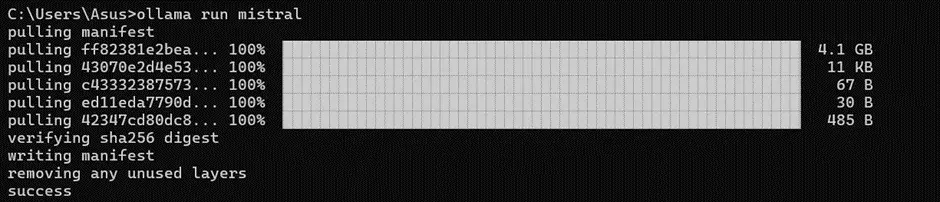
Llama2 Uncensored
Now that I’ve mentioned the uncensored model, let’s jump into that. Follow these steps to install and run the uncensored model locally!


ollama run llama2-uncensored

So, yeah! that’s not all for using various AI models locally on your computer. We can get into this more deeply and it has vast use cases! Don’t hesitate to try out different models on your own and share your thoughts, ideas, and more with me in the comments or DMs. I’ll be positively waiting for your input!


Comments