Shodan: Search Engine Where U Must Learn How to Search
- Aastha Thakker
- Oct 30, 2025
- 3 min read


If Google is the search engine for websites, Shodan is the search engine for the internet’s hidden machines, from webcams, databases, power grids, to sometimes even nuclear controls.
Created by John Matherly in 2009, Shodan (named after the antagonist in System Shock) is a search engine that continuously scans the entire IPv4 address space, cataloging every internet-connected device it finds.
Unlike traditional search engines that crawl web pages, Shodan performs network scans on common ports, collecting banner information from:
Web servers
Security cameras
Industrial control systems
IoT devices
Database servers
Network infrastructure
And millions of other connected devices
The Numbers That Will Shock You
As of 2025, Shodan has indexed over 4.5 billion devices across more than 8,000 different ports. Every month, it processes over 2.5 petabytes of data, making it one of the most comprehensive internet mapping services in existence.
Why Shodan Matters?
The IoT Explosion: With an estimated 27.1 billion connected IoT devices in 2025, Shodan provides a way to find exposed devices that often lack basic security controls, from smart cameras to industrial systems. (Autobits Labs)
Remote Work Security: The shift to remote work has left many organizations with a sprawling, unsecured digital perimeter. Shodan helps security teams discover exposed remote access points, such as open RDP and VPN services, that are a prime target for attackers. (Shodan Blog)
Supply Chain Security: Recent attacks have shown that a company is only as secure as its vendors. Shodan allows for third-party risk assessment by scanning a vendor’s external network for vulnerabilities, providing an “outside-in” view of their security posture. This helps organizations proactively identify weaknesses in their supply chain. (ThreatNG Security)
Getting Started: Your First Shodan Search
Creating Your Account
Visit shodan.io and create a free account
Verify your email address
Consider upgrading to a paid plan for advanced features
Your First Search
Let’s start with something simple but eye-opening. Try searching for:
apache
Each result represents a real device somewhere in the world running an Apache web server that Shodan has discovered and cataloged.
Understanding the Interface
Each search result contains:
IP Address: The device’s internet address
Port: Which network port is open
Banner: Information the service revealed about itself
Location: Geographic location (when available)
Organization: ISP or hosting provider
Timestamp: When Shodan last scanned this device
Essential Search Filters and Operators
Shodan’s power lies in its filtering capabilities. Here are the basic essential filters you should know.
Geographic Filters
country:US
city:"New York"
geo:"40.7128,-74.0060,10"  // Latitude, longitude, radius in km
Network Filters
net:192.168.1.0/24        // Specific IP range
port:22                   // Specific port
hostname:medium.com      // Hostname
Service Filters
product:nginx             // Specific software
version:1.18.0           // Software version
os:"Windows Server 2019" // Operating system
Examples
Find all webcams in India:
country:IN product:webcam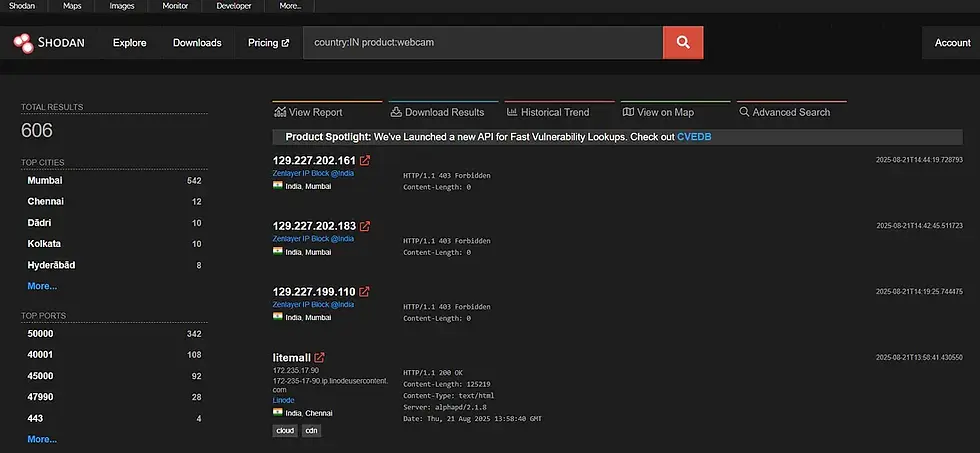
Locate MongoDB databases with authentication disabled:
product:MongoDB -authentication
Screenshots: Many devices captured by Shodan include screenshots of their interfaces:
has_screenshot:true port:80 country:IN
This reveals web interfaces for routers, security cameras, industrial systems, and more.
Ethical and Legal Considerations
Using Shodan responsibly requires understanding both its power and the responsibilities that come with it.
Core Principles:
Only use Shodan for authorized security research, asset management, or educational purposes
Never attempt to access or interact with systems you don’t own
Be mindful that you’re viewing information about real systems and organizations
If you discover vulnerabilities, follow responsible disclosure practices
What’s Generally Acceptable:
Searching public Shodan data
Analyzing your own organization’s assets
Academic research on internet trends
Security posture assessment (non-intrusive)
What to Avoid:
Attempting unauthorized access to systems
Using discovered credentials or vulnerabilities
Targeting specific individuals or small businesses
Conducting activities that could be considered stalking or harassment
Best Practices
Document Your Intent: Keep records of why you’re conducting specific searches
Limit Scope: Focus searches on your legitimate areas of concern
Avoid Interaction: Don’t attempt to connect to or interact with discovered systems
Respect Rate Limits: Don’t abuse API access or attempt to circumvent restrictions
Stay Updated: Keep current with terms of service and acceptable use policies
See you next Thursday!
Till then keep searching, keep discovering what shouldn’t be online (spoiler: everything), and remember — if you can find it on Shodan, so can everyone else.


Comments