MobSF: Hack Like a Pro, Secure Like a Boss
- Aastha Thakker
- Oct 28, 2025
- 3 min read

In our day-to-day life, mobile applications integrate into our lives, like our essential body parts. From food delivery to maps and finance management, they enhance convenience just like a wow! However, as our dependency on mobile app has increased, so does the critical need for robust cybersecurity measures. Therefore, mobile app testing has become an integral part of cybersecurity. Before going into the testing aspect, I recommend you get familiar with OWASP’s top 10 mobile risks. In this blog, I will specifically focus on installing MOBSF (Mobile Security Framework) in Linux and conducting static analysis of an application.

What is MobSF?MOBSF stands for Mobile Security Framework. It is an open-source mobile application (Android and iOS) security testing platform that allows users to assess the security of the applications. It can be used for mobile app security, penetration testing, malware analysis etc.
MobSF’s Features & Benefits
Automated Security Scanning: MobSF scans the apk automatically after uploading. It checks codes, vulnerabilities, how data flow, etc which helps to reduces the risk of cyber threats.
Dynamic Analysis: Dynamic analysis means analysis the app in real time or run time. MobSF has this functionality.
Static Analysis: Static analysis means analysing the app without executing or running it. It checks application source code, binaries, and configurations for vulnerabilities.
Reverse Engineering: MobSF checks the code line by line. It enables de-compilation, disassembly, and debugging.
Comprehensive Security Analysis: Its customizable and adaptable nature ensures that your app meets security standards and keeps users’ data safe.
Types of Analysis:
Static Analysis with MobSF
MobSF has the feature of static analysis, which means testing a mobile application’s code without execution. This helps in identification of vulnerabilities. We will be focusing more on this today.
Dynamic Analysis with MobSF
MobSF also supports dynamic analysis, which means analyzing the behavior of a mobile application while it’s running. This helps to identify realtime or runtime vulnerabilities. When we upload the application to MobSF and then install it on a device or emulator. Once installed, MobSF captures and analyzes the network traffic generated by the application, examining URLs accessed, parameters in requests, and server responses. The resulting report provides detailed insights into the application’s network interactions, aiding in the identification of potential security issues. This will be covered in my upcoming blogs.
Installing MobSF
Step 1: Go on the github page and download Mobsf from there. Its open-source, free and easy to install. Hope you’re ready to click that link in a flash! 😉

Step 2: For installing necessary dependencies and setting up MobSF tool, type this command.
sudo ./setup.sh

Step 3: After the requirements are installed, we have to run/host MobSF on a server with a loopback IP (127.0.0.1) & port(8000).

Step 4: Now, open any web browser type “http://127.0.0.0.1:8000” Don’t forget to verify your loopback IP & port. It will come up with a page like this:

Alternative: docker method
Step A: Install Docker
sudo apt install docker.io
Step B: Install MobSF
sudo docker pull opensecurity/mobile-security-framework-mobsf
Step C: Run MobSF.
sudo docker run -it — rm -p 8000:8000 opensecurity/mobile-security-framework-mobsf:latest
Static analysis of application:
Step 5: Now, we are good to go! Let’s upload our targeted apk & it will start automated analysis.
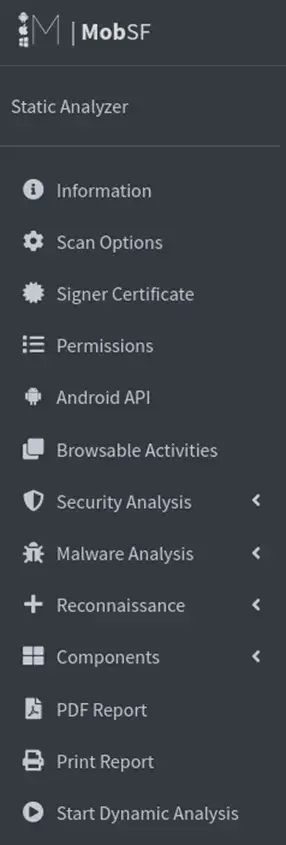
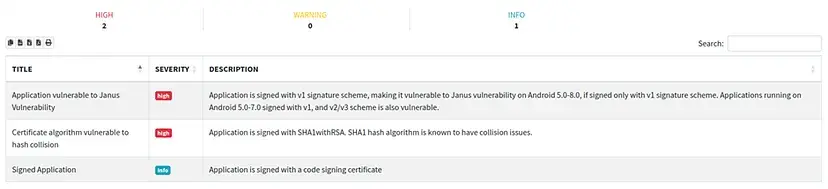
Step 6: The result we got is an automated report which provides details of application, including vulnerabilities, codes, components etc. It also has the severity rating of each vulnerability.

Step 7: Now, we got a report. Based on that & severity of vulnerability, we will be addressing the identified issues. We can even check the vulnerabilities manually by learning from the links provided.

Conclusion
So, for testing or practicing, download apks from websites like APKMirror, PureAPK, or APKCombo which gives real-world scenarios to assess and improve your skills. Don’t wait unless a potential vulnerability becomes a nightmare. Feel free to connect with me on LinkedIn or DM me to share your findings and discoveries.
For docker, take this as reference if needed; Getting Started (mobsf.github.io)
Let’s learn together! Happy testing!


Comments