Axios NPM Compromise


You didn’t click anything suspicious. You didn’t open a shady email. You didn’t visit some fishy website. You just ran a command you’ve run a hundred times before:
npm installAnd that was enough.
On March 31, 2026, the axios npm package, one of the most downloaded JavaScript libraries on the planet, was weaponized. The attack was clean, fast, and frighteningly well-planned. By the time most developers had their morning coffee, the malicious packages had already been live for three hours, and an unknown number of machines had a Remote Access Trojan quietly sitting on them.
If you ran npm install between 00:00 and 03:30 UTC on March 31, 2026, and your project uses axios, keep reading. This is about you.
What Even Is axios?
Axios is a small piece of code that lets JavaScript programs talk to the internet. Want your web app to fetch data from a server? Send a form? Call an API? axios handles that plumbing. If a JavaScript project makes any kind of network request, there’s a good chance axios is somewhere in the chain.
How popular? Over 100 million downloads per week on npm is there. For context, most npm packages get a few thousand downloads a week. This is a completely different scale. And that scale is exactly what made it such an attractive target.
Here’s another thing worth knowing, you often don’t install axios directly. You install some other package, a WordPress build tool, a CLI utility, an API wrapper and that package depends on axios, which gets pulled in quietly as a “transitive dependency.” Plenty of developers who got hit by this attack didn’t even know axios was in their project.

The Attack Timeline
This wasn’t a smash-and-grab. Whoever did this take time to set things up carefully.

Three hours. That’s the window. But at 100 million downloads per week, three hours is an enormous exposure. CI/CD systems run 24/7, they don’t care that it’s 1 a.m.
How the Attack Actually Worked
The attacker never touched axios’s source code. If they had modified the library’s actual JavaScript files, automated tests and code reviewers might have caught it.
Step 1: The Ghost Dependency
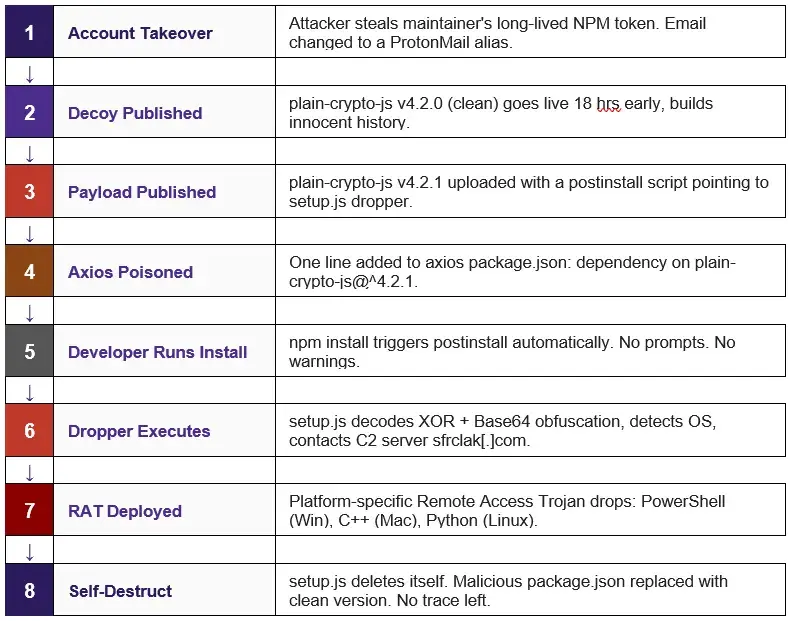
The attacker compromised the jasonsaayman npm account — the primary maintainer of the axios project. The account's registered email was changed to ifstap@proton.me, an attacker-controlled ProtonMail address. Using this access, malicious builds were published across both the 1.x and 0.x release branches simultaneously, maximizing the number of projects exposed.
The attacker added a single line to axios’s package.json file, the file that lists what other packages axios depends on:
“plain-crypto-js”: “^4.2.1”That’s it. One line. To a casual reviewer, it looks like a harmless cryptography utility. No one would bat an eye. And the library was never actually imported into any of axios’s 86 source files, it existed purely to get installed, and to run its postinstall script.
postinstall scripts are a feature of npm that run automatically when a package is installed. You never see them. You never approve them. They just run.
Step 2: The Obfuscated Dropper
The malicious package included a file called setup.js. It didn’t look dangerous. The attacker used two layers of encoding to hide what it was doing from static analysis tools:
Layer 1: Strings reversed and encoded in Base64
Layer 2: XOR cipher using the key OrDeR_7077
All the important stuffs like server addresses, file paths, shell commands were hidden in an encoded array and only decoded at runtime. This let the package slip past automated security scanners that check new npm uploads.
Once decoded, the dropper checks what operating system it’s running on, then reaches out to the attacker’s command-and-control server. The outbound traffic was disguised to look like it was going to packages.npm.org, the real npm registry. In your network logs, it looks like a normal package install.
Step 3: Three RATs for Three Platforms
What came down from that server wasn’t some generic piece of malware. The attacker built three separate implementations of the same Remote Access Trojan, one for each major operating system:
Windows: PowerShell script, disguised as a renamed Windows Terminal binary (wt.exe)
macOS: C++ binary, dropped into /Library/Caches/ to look like an Apple system process
Linux: Python script, placed in /tmp/ld.py
Same command-and-control protocol across all three. Same beacon timing. Same data being sent back. Once running, the RAT immediately starts reading your filesystem, your running processes, your environment variables and sends all of it back to the attacker.
Step 4: The Self-Destruct
After everything runs, setup.js deletes itself. The malicious package.json gets replaced with a clean version that shows no postinstall scripts whatsoever. By the time npm install finishes, there’s almost nothing in your node_modules folder to indicate anything happened.
The only reliable forensic evidence that survives is in your package-lock.json or yarn.lock, your lockfile, which records the exact resolved versions of everything that was installed.
// 1. Delete setup.js itself
fs.unlink(__filename, () => {});

// 2. Delete the malicious package.json (contains "postinstall")
fs.unlink("package.json", () => {});

// 3. Install clean stub — npm list will now report v4.2.0, not v4.2.1
fs.rename("package.md", "package.json", () => {});
Attack Flow
Why This Hits Different
Most security incidents have an obvious moment where something went wrong. You clicked a bad link. Someone used a weak password. An unpatched server got exploited.
This one doesn’t have that moment.
The developers who got hit weren’t careless. They were doing exactly what they’re supposed to do, using established libraries, running standard install commands, following normal workflows. The supply chain attack model is dangerous precisely because it weaponizes the trust that makes the entire open-source ecosystem function.
If you still didn’t the point of seriousness, think you always buy your coffee from the same trusted roaster. Someone poisons a batch of the beans at the roastery. Every single person who buys coffee from that roaster that week gets sick & none of them did anything wrong. That’s a supply chain attack.
Now, what if instead of poisoning one roaster, you poisoned the supplier that provides beans to 500 roasters? That’s axios. 174,000 projects depended on it. The average npm project trusts somewhere between 200 and 2,100 individual packages written by people you’ve never met, maintained by volunteers on their weekends, funded by nobody, open-source.
Are You Affected? Check Right Now
# Check if you have the malicious version
npm list axios
# Look for 1.14.1 or 0.30.4 — stop if you see them

# Deeper scan across your entire system (Mac/Linux)
find / -name "package-lock.json" 2>/dev/null | xargs grep -l "plain-crypto-js" 2>/dev/null

# Most reliable post-infection check — directory presence
ls node_modules/plain-crypto-js
# If this directory exists at all, the dropper ran.
# plain-crypto-js is NEVER a dependency of any legitimate axios version.
Check your network logs for any connections to sfrclak[.]com, that’s the attacker’s command-and-control server. Block it at your firewall regardless.

What to Do Now
If you found the compromised versions, do not just run npm uninstall and call it a day. The malware already ran during the install. The package is gone but the RAT can be still there.
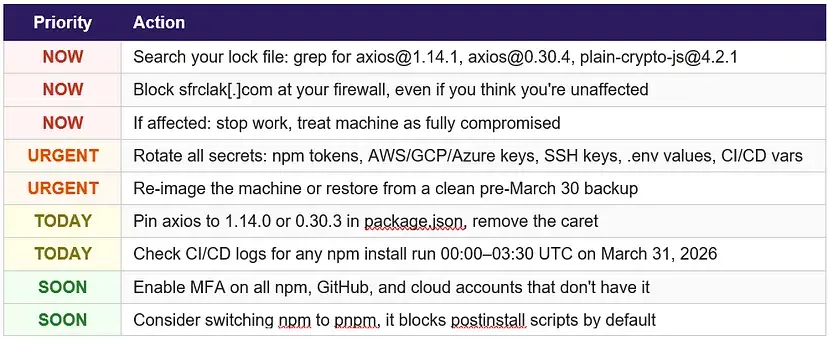
Do not skip rotating your secrets. The RAT started reconnaissance immediately, reading environment variables, filesystem roots, running processes. If your API keys or tokens were accessible during that install, assume they were read.
Indicators of Compromise
Malicious npm Packages
axios@1.14.1 · shasum: 2553649f2322049666871cea80a5d0d6adc700ca
axios@0.30.4 · shasum: d6f3f62fd3b9f5432f5782b62d8cfd5247d5ee71
plain-crypto-js@4.2.1 · shasum: 07d889e2dadce6f3910dcbc253317d28ca61c766
Network Indicators
C2 domain · sfrclak.com
C2 IP · 142.11.206.73
C2 URL · http://sfrclak.com:8000/6202033
C2 POST body (macOS) · packages.npm.org/product0
C2 POST body (Windows) · packages.npm.org/product1
C2 POST body (Linux) · packages.npm.org/product2
File System Indicators
macOS · /Library/Caches/com.apple.act.mond
Windows (persistent) · %PROGRAMDATA%\wt.exe
Windows (temp, self-deletes) · %TEMP%\6202033.vbs
Windows (temp, self-deletes) · %TEMP%\6202033.ps1
Linux · /tmp/ld.py
Attacker-Controlled Accounts
jasonsaayman · compromised legitimate axios maintainer, email changed to ifstap@proton.me
nrwise · attacker-created account, nrwise@proton.me, published plain-crypto-js
Safe Version Reference
axios@1.14.0 (safe) · shasum: 7c29f4cf2ea91ef05018d5aa5399bf23ed3120eb
What This Should Change
What you can do without waiting for systemic change:
Pin your dependencies to exact versions. Replace ^1.14.0 with 1.14.0 in package.json. The caret is convenient but it’s what made this attack spread automatically.
Commit your lockfiles to version control. Your package-lock.json is your forensic record. Without it, you can’t audit anything.
Look at pnpm as an alternative to npm. By default, pnpm blocks postinstall scripts for all packages except those you explicitly allowlist. This specific attack vector, a malicious postinstall hook, would have been silenced.
Use tools that monitor packages for suspicious changes. Socket.dev caught this attack early. That kind of real-time monitoring on your dependency graph is worth having.
Run regular audits of what’s in your dependency trees. Most teams have no idea what transitive dependencies they’re actually running.
Treat package installs in your build pipelines the same way you treat code running in production. Because that’s what they are.
This Is Part of a Pattern
Axios wasn’t picked randomly. Earlier in March 2026, the group known as TeamPCP compromised Trivy (a security scanner), LiteLLM (a Python LLM library), and Telnyx. Whether the same actors hit axios is not yet confirmed, the attack hasn’t been attributed to any known group. The attacker used ProtonMail addresses for everything. Every few years, a widely trusted package maintainer’s account gets compromised and the malicious version spreads before anyone notices. The ecosystem reacts, tooling improves slightly, and then it happens again.
The honest reality is that open-source software is built and maintained by individual people, often unpaid, often working alone, often with no institutional support. The person who maintained axios had a single account with a long-lived access token. When that token was stolen, 174,000 projects were exposed. That’s not a personal failing on his part. That’s a structural problem with how the ecosystem handles trust and access.
Most of the people who got hit by this were doing everything right. That’s the uncomfortable truth about supply chain attacks. The fix isn’t individual vigilance; it’s structural change in how the ecosystem handles trust. The open-source ecosystem depends on all of us taking this seriously.


Mình thỉnh thoảng cũng xem soi cầu cho vui thôi, coi như một cách tự tập nhìn dàn số và đối chiếu lại cảm giác của mình. Hồi trước hay nghe người quen mách gì thì ghi nấy, trật vài lần là khó chịu, nên giờ mình ưu tiên đọc kiểu có phân tích, có lập luận để dù đúng hay sai vẫn rút ra được cách nghĩ. Có dạo lướt trúng https://soicauxsmb.pro/ thấy họ hay nói về chuyện lọc theo chu kỳ, mình thử áp dụng theo hướng “giảm bớt lựa chọn” chứ không đặt niềm tin tuyệt đối, và thấy đỡ bị cảm xúc kéo đi hơn. Với mình mấy cái này chỉ nên xem như tham khảo,…