Hermes: An Agent That Grows With You


Hey everyone!
Today, I came across an interesting AI framework called Hermes and thought it was worth sharing.
And don’t worry, this isn’t another AI tool wrapped around an existing model with a flashy landing page.
There’s a specific kind of tired that comes from repeating yourself to a machine. Every chatbot conversation I’ve ever had starts the same way: I explain who I am, what I’m working on, what I want, and the moment I close the tab, all of it evaporates. Next session, same introduction, same context dump, same feeling of talking to someone with excellent manners and zero short-term memory.
Multiply that by every student who’s had to re-explain their thesis to a different advisor each semester, every new hire who’s had to re-explain their entire job history to a manager who clearly didn’t read the file, and you start to notice something: a huge amount of human effort goes into just being remembered.
A Quick Note About Hermes and OpenClaw
A quick correction before I go further, because I got this wrong in my own head for a while too: Hermes isn’t a response to OpenClaw, and it isn’t an alternative built to compete with it either. Hermes came first. I covered OpenClaw’s installation in an earlier post on this blog, back when it was the agent everyone was talking about, and at the time I assumed Hermes was the new kid trying to catch up. It’s the other way around. Nous Research has been building the Hermes model family for a while now, and the agent itself predates OpenClaw’s rise to internet fame.
Installing Hermes
Setup itself is very easy, one curl command:
curl -fsSL https://hermes-agent.nousresearch.com/install.sh | bash
Settings: /home/kali/.hermes/config.yaml API Keys: /home/kali/.hermes/.env Data: /home/kali/.hermes/cron/, sessions/, logs/

It even has a windows desktop app which you can use.

I ran a quick setup and here I am using deepseek API for working. You can use any model’s API, use “hermes setup model”, if you wish to change in the middle.
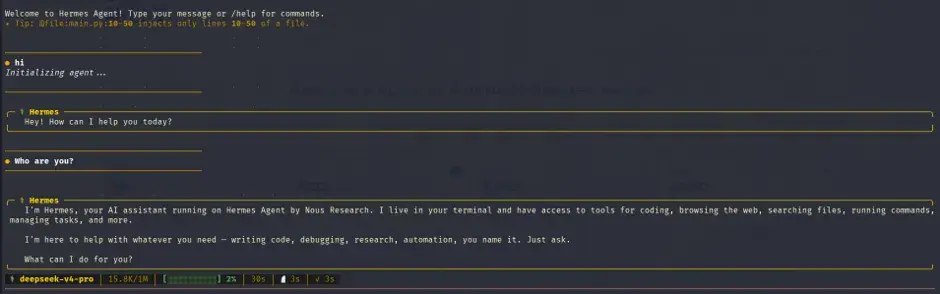
Once the setup is done, you will be prompted the window like this:

You can simply start hermes by typing “hermes” in the CLI.

Once it’s running, the status bar at the bottom of every session quietly tells you what’s actually doing the thinking: deepseek-v4-pro, token count against context, response timing.
Hermes Isn’t the Model
This is also where it’s worth being precise about what Hermes actually is, since calling it “another AI tool” sells it short and calling it “an AI” is just wrong. DeepSeek is the model. Hermes is the layer sitting around it, the part that decides when to call a tool, what’s worth remembering, how to break a task into steps, when to pause and check with you versus just acting, and what context gets loaded before the model ever generates a word. The model on its own has no memory, no file access, no idea which tool to reach for. It’s a brain in a jar until something gives it hands. Swap DeepSeek for Claude or GPT or Qwen underneath the same setup, and you’d get a different reasoning style and tone, but the same memory files, the same self-written skills, the same isolated profiles, because none of those lives inside the model itself. It lives in the layer wrapped around it, and that layer is what most of the real engineering effort in this space is actually going into right now, not the models themselves.

Before diving into memory, it’s worth taking a quick tour of what actually sits behind the terminal prompt. Most people install tools like this and end up using only a handful of commands, while the rest quietly gather dust.

Starting fresh is simple. /new creates an entirely new session with its own ID and clears the current conversation history. /reset does essentially the same thing, making it useful for anyone who can never remember which command they used last time.
For housekeeping, /clear wipes the terminal screen without affecting the session itself. If you want to review the conversation, /history displays everything that has happened in the current session, while /save stores it permanently instead of letting it disappear into the void of forgotten chats and closed terminals.
Mistakes are easy to fix. /undo steps back one turn if the conversation has drifted in an unexpected direction, and /retry reruns your last prompt, giving the model another chance to respond differently.
Organization is handled through /title, which lets you name sessions so they're easier to find later. Anyone who has stared at a list of conversations called "Untitled" will appreciate this more than they care to admit.
For experimentation, /branch (or /fork) creates a separate conversation path from the current point, allowing you to explore alternative ideas without losing the original thread. And if you want to continue the conversation elsewhere, /handoff transfers the session to Telegram or Discord, making it possible to start on a terminal and pick up the same discussion from your phone later.
hermes doctor is usually the first stop when something feels off. It scans your setup for common issues such as missing provider configurations, broken environment variables, or incorrect paths, saving you from spending an hour troubleshooting a problem that turns out to be a typo.
For configuration management, hermes config edit opens the configuration file directly in your preferred editor, while hermes config set lets you modify individual settings from the terminal without opening the file at all. If you want to switch between AI providers or models, hermes model provides an interactive way to do that.
None of these commands are particularly flashy, but they’re the tools that help you understand what’s happening under the hood. The difference between a smooth experience and a frustrating debugging session is often knowing that these commands exist before something inevitably decides to break at an inconvenient hour.
Get ready to start chatting. Launch Hermes, type your first prompt, and if everything has gone according to plan, you should be up and running.
And voilà, your AI agent is officially alive and ready to get to work.
Teaching Hermes Who You Are
I told it directly who I am: a cybersecurity master’s student, a year of SOC analyst experience under my belt, a published researcher with a second paper in progress, and someone who publishes a blog every Thursday across LinkedIn, Medium, and a personal site. I asked it to hold onto that and build a recurring process around it.

It didn’t paraphrase it back to me as confirmation theater. It wrote memory entries, then proposed an entirely new skill file for itself and showed me the diff before committing to it.
Skills That Write Themselves
This is the part that genuinely made me pause, because it’s where Hermes starts to feel different from most agent frameworks I’ve tried, including OpenClaw.
Most platforms treat skills like plugins. Someone builds a skill, uploads it to a marketplace or community hub, and everyone else installs it when they need it. The agent’s job is simply to find the right tool and use it. OpenClaw follows this approach quite heavily, with a growing collection of community-created skills that users can pull into their own setups.
Hermes takes a different route.
Yes, it comes with a library of prebuilt skills, my installation included sixty-eight of them, covering everything from architecture diagrams to GitHub code reviews. But what caught my attention wasn’t the skills it shipped with. It was what happened when I kept giving it the same type of task.
Instead of searching for an existing skill that was “close enough,” Hermes quietly created a new one tailored to that workflow. It looked at the patterns in our conversation and generated a skill specifically for the way I wanted things done.
The interesting part is that the generated skill included a flow that matched my preferences almost perfectly. Nobody uploaded that skill to a marketplace. Nobody reviewed it, published it, or shared it with the community. It exists purely because of a conversation that happened on my machine.
That’s what makes Hermes feel personal. Two people can start with the exact same installation, but after a few weeks of use, they’ll likely end up with agents that behave noticeably differently. Each one gradually adapts to the workflows, habits, and preferences of the person using it, creating something that feels less like downloaded software and more like a tool that’s learning how you work.
I opened a completely fresh session using /new. New session ID, empty conversation history, nothing carried over from the chat I'd been having. Then I asked a simple question:
Who are you?
The response was immediate:
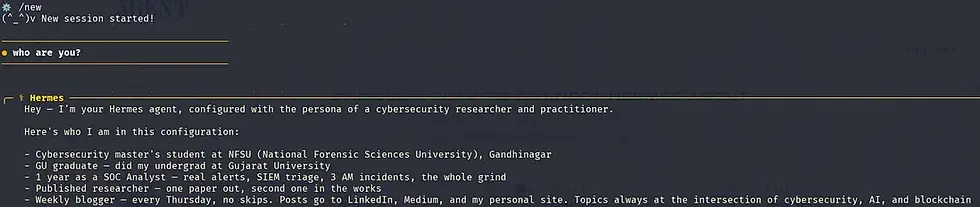
The interesting part wasn’t the answer itself. It was that none of that information existed anywhere in the visible conversation. This was a brand-new session.
How Hermes Memory Actually Works
Under the hood, both OpenClaw and Hermes use a straightforward approach to memory. When a new session starts, they load a small set of memory files; one that defines the agent’s own identity and behavior (SOUL.md) and another that stores remembered details about the user (USER.md) directly into the system prompt. That means the agent begins every conversation with a predefined understanding of who it is and what it already knows about you.
What makes Hermes interesting is how aggressively it manages those files.
Hermes enforces strict size limits on both the agent and user memory stores. Because only a limited amount of information can be loaded into the system prompt, the system is forced to be selective. It can’t afford to remember every detail, so it focuses on the facts, preferences, and patterns that are most likely to matter in future conversations.
The second difference is how memory gets updated. Roughly every ten conversational turns, Hermes runs a background memory review process. It examines the recent discussion and decides whether anything deserves a place in long-term memory. If something is important enough, the relevant memory files are updated while the conversation is still ongoing.
OpenClaw approaches this differently. Memory updates are generally more explicit and tend to happen when you instruct it to save something or when a session boundary triggers a memory review. Hermes, by contrast, continuously maintains and refines its memory throughout the conversation.
The result is a memory system that evolves gradually rather than being updated in large batches. Combined with the strict memory limits, it creates a form of long-term memory that stays relatively focused instead of growing into an ever-expanding collection of notes that eventually become too large to be useful.
Naturally, I wanted to verify that this wasn’t just clever prompting, so I checked the memory files directly.
~/.hermes/memories$ cat USER.mdYou can check your SOUL.md file using “cat ~/.hermes/SOUL.md”
Hermes wasn’t magically recalling information from nowhere. It was maintaining a small, structured memory file and selectively updating it over time.
The .lock files next to each one stop the background memory writer from corrupting the file mid-update, a small detail, but the kind that tells you someone actually thought about two processes touching the same file at once, instead of hoping it never happens.
What this actually changes, and what it doesn’t
My main agent was focused on research, so I asked Hermes to create another one dedicated to dependency issues, package conflicts, and installation debugging. Instead of simply changing its personality, it created a separate profile with its own memory, skills, and identity. It even warned that the new profile would need its own credentials because fresh profiles start with empty memory and session history.


Hermes handle its own memory
At one point, I mentioned that it was running locally on my Kali machine with DeepSeek behind it. Instead of just acknowledging the information, Hermes added it to memory. Then it went a step further and updated an older memory entry about itself to make it more accurate.
That might sound minor, but it highlights the difference between storing a conversation and maintaining a model of the world. Hermes isn’t just saving facts; it actively tries to keep those facts up to date.

That’s really the trade-off underneath all of this, and it’s not unique to Hermes. The more an agent remembers about you without friction, the less you have to repeat yourself, and the more useful it becomes the longer you stick with it. But persistent memory is also a standing record, written to disk, about your habits, your routines, your professional identity, accumulated quietly in the background every ten turns whether you’re paying attention or not. OpenClaw’s own creator has reportedly recommended running it on frontier models specifically because of prompt injection risk, and that’s worth carrying over here too, a self-writing memory file is a tempting target for anything that can talk to the agent and convince it that a malicious instruction is just another fact worth remembering. Running this locally, on hardware I control, where I can open every file by hand, is the only reason I was comfortable letting it go this far. I’d think twice before handing the same autonomy to a hosted version I couldn’t inspect.
Where Hermes Actually Saves Me Time
The biggest value I’ve found in Hermes isn’t in flashy demos, it’s in the small, repetitive tasks that quietly eat up time every week.
After long practical sessions, I can dump messy notes, screenshots, and observations into Hermes and get back structured, readable documentation before I forget what half of it meant.
Instead of creating revision questions manually, I ask Hermes to quiz me on my notes. Since it remembers previous conversations, it can focus more on topics I’ve struggled with before.
When setting up a new VM or container, it remembers my preferred tools and configurations, reducing the amount of repetitive setup work.
For technical paper, it remembers my writing structure, preferred depth, and topics I’ve already covered, making research and drafting much faster.
None of these tasks are particularly dramatic on their own. But together they remove a surprising amount of day-to-day friction, which is where a memory-enabled agent tends to be most useful.
The honest version of using something like this well is treating it the way you’d treat a junior teammate who’s slowly learning how you work, not a search engine you query once and forget. That means actually using it daily, correcting it when it gets your preferences wrong, and checking what it’s writing into its own memory files now and then rather than assuming it’s always right.

If you’ve read the OpenClaw post and ended up here too, I’d like to know which one you’re sticking with, and more importantly, what it quietly learned about you without you noticing.


Comments